Children Page
Use the Children page of the Group Service editor to configure node child properties. The Children page does not appear if the selected GRP node is a leaf node.
|
Group Service Editor - Children Page |
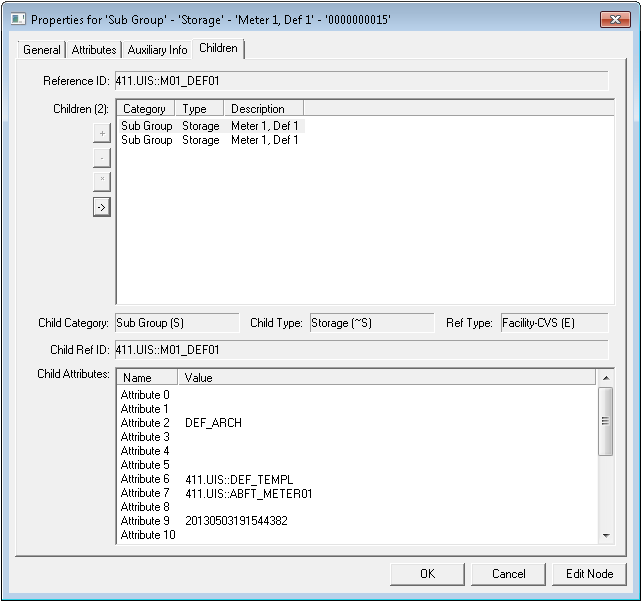
Children Page Properties
The following table lists and describes the Children page properties of the GRP editor.
For more information, see also Node Category, Type, and Attribute Identifier.
| Property | Description |
|---|---|
|
Reference ID |
Corresponds to the reference entity ID selected on the General page. If this field is populated, the relevant GRP attributes for the referenced entity appear below it. If it is blank, the attributes that appear below are unique to the GRP node itself. |
|
Children |
A child in a parent - child hierarchy is a subordinate entity. For example, a level is a child of a view. This table lists the child(ren) for the selected node. Columns include Category, Type, and Description. Command options for this field are as follows:
|
|
Child Category |
The node category of a child highlighted in the Children field above. |
|
Child Type |
The node type of a child highlighted in the Children field above. |
|
Ref Type |
The reference type of a child highlighted in the Children field above, if one exists for the child node. Corresponds to the (reference) Type drop-down menu on the General page. |
|
Child Ref ID |
The reference ID associated with the selected child, if one exists for this node. |
|
Child Attributes |
Relevant GRP attributes unique to the selected child. |
 If active, enables you to add a child.
 If active, enables you to remove a child.
 If active, opens the selected child node's General record.
 If active, enables you to view the selected child node's children.
